Configuration - Plan
In this section, you can change plan scale, you can choose points
drawing mode and you can configure layers allocated for points.
Printing factor for usual scales in metric system is:
-
for 1:100 it prints with 10=1
-
for 1:200 it prints with 5=1
-
for 1:500 it prints with 2=1
-
for 1:1000 it prints with 1=1
-
for 1:2000 it prints with 1=2
-
for 1:5000 it prints with 1=5
-
for 1:10000
it prints with 1=10
-
etc.
Printing factor for usual scales in english
system is:
-
for 1:1200
it prints with 1=100
-
for 1:2400
it prints with 1=200
-
for 1:4800
it prints with 1=400
-
etc.
You can draw points in the drawing in the following ways:
1.only with name (number) and the views are like
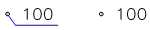
with or without leader line (leader lines can be eliminated by
closing layer with leader lines)
2.only with point elevation and the views are like

with or without leader line
3.with name and elevation and the views are like

When you draw point elevation text, you can choose the number of
decimals to write elevations.
Interpreted code of the point will always be written under the leader
line on the allocated layer for codes.