NrPlan
 Command line: nrplan
Description: load plan layout
number…
 TopoLT toolbar:

Menu: TopoLT » Plan layout » Load
plan layout number…
By applying this command
you can load in viewports (holes left in paper space) saved Views with plans
layouts.
This command functions
only in PAPERSPACE meaning TILEMODE=0.
To load plans, profiles,
etc. saved with command FormPlns
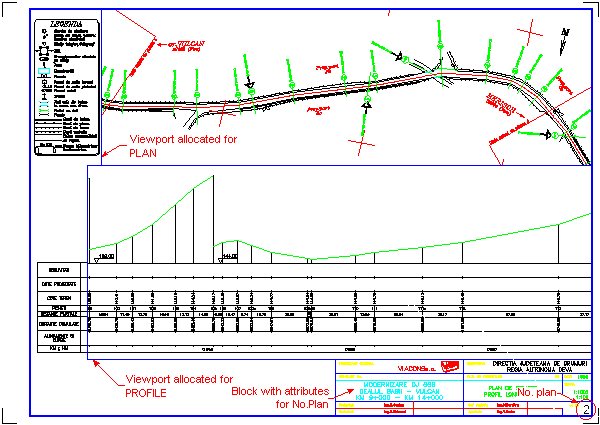
it will demand to select Viewport allocated for PLAN, Viewport allocated for
PROFILE, etc., the attribute block containing the attribute referring to the
number of the plan layout and the text assigned to the objects. The block with
attributes as well as the text assigned to the objects are required only if
their identification names were set during the configuration. Modification of
these settings can be done using the TopoCfg command –
Plan Layout Section. You can find more
information on how to use the plan layout completion options in the Plan Layout Section.
If you do not want the
Viewport border to be visible at plotting then you can close layer on which
Viewport was defined or you can set the layer as unprintable.
An example about loading
two Views (PLAN and PROFILE) linked with example from command FormPlns is described
in the following figure.